


My Family - Family Locator
4.4962.00 Reviews
App Specs
- Version
- 1.10.37
- Updated On
- License
- Free
- Downloads
- 5,000,000+
- Developer
- Friendzy Limited
- Categories
- Parenting
- Platform
- Android, iOS
Screenshots
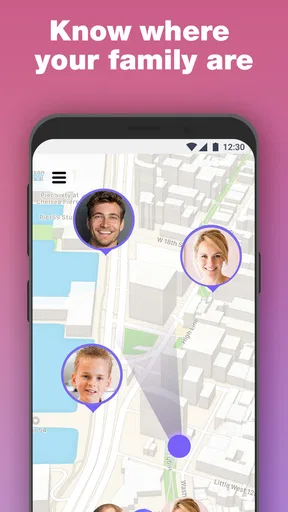
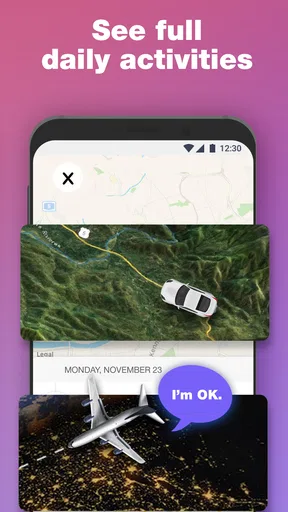
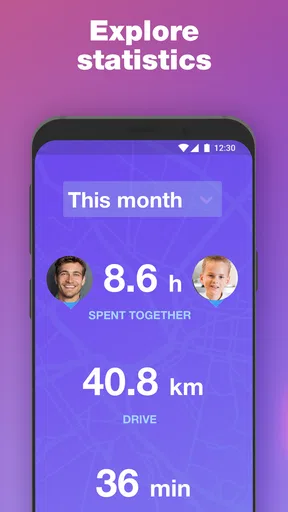
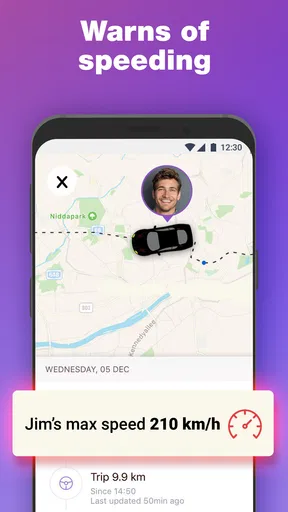
 Analysis by AppCompare
Have you ever had one of those moments where you wonder where everyone in your family is? Whether you're trying to coordinate a family get-together or just want peace of mind knowing your kids made it to school safely, My Family - Family Locator could be your new best friend. I’ve been using it for a bit, and let me tell you, it’s like having a digital guardian keeping tabs on everyone. Let’s dive into what makes this app a must-have.
Stay Connected, Wherever You Are
First things first, the app is super easy to set up. I’m talking about a few taps, and boom, you’re ready to roll. You can add family members by sending them an invite via SMS or email. Once they join, you can see everyone on a map. It’s not just about locating them; it’s about staying connected, no matter where you are.
Features That Keep You in the Loop
My Family - Family Locator comes loaded with features that make it more than just a map with dots. For starters, the real-time location tracking is pretty spot-on. I was impressed by how accurately it pinpointed my kids’ school and my partner’s office. Plus, there are location history logs, so you can see where everyone’s been throughout the day. Handy, right?
There’s also a handy geofencing feature. What’s that, you ask? It’s like setting up invisible boundaries on the map. You’ll get notifications when someone enters or leaves a certain area. This came in clutch when I wanted to make sure my teenage son was actually at his friend’s house and not wandering off somewhere else.
Safety First
Safety is a big deal, especially for parents. The SOS button is a feature that stands out. If someone in your circle is in trouble, they can press it to send an emergency alert with their location to everyone. It’s a reassuring feature, especially when your family is out and about.
Privacy Concerns? Not Here!
Now, I know what you’re thinking: with all this tracking, what about privacy? The app takes this seriously. You can customize who sees what and when. Plus, you can turn off location sharing if you need a little "me" time. It’s a balance between staying connected and respecting personal space.
Easy on the Eyes and Easy to Use
The user interface is clean and intuitive. Even if you’re not tech-savvy, you’ll find your way around it with ease. The map is clear, and the icons are self-explanatory. No clutter, no fuss. Just straightforward functionality.
Worth Reading Before You Choose

Switching to Android Auto Means Rethinking Your Driving Routine

Google Calendar Makes a Crowded Week Easier to Manage

Baby Panda World Brings Quick Play to Modern Phones, but Its Game Library Feels Busy

ESPN’s Live Game View Makes Following Close Games Easier

QuizzLand Review: A Good Fit for Short Trivia Breaks, Not Every Player

Basketball Stars: Multiplayer Is Fast, but Can It Recover When Matches Go Wrong?
Battery-Friendly Tech
One thing I was worried about was whether it would drain my phone’s battery. Surprisingly, it’s pretty efficient. The app uses location services smartly, so your phone’s juice isn’t sucked dry within hours. It’s nice to know you can keep tabs without having to be tethered to a charger all day.
What Connectivity Means in Daily Use
Because this is a family locator, its usefulness depends on the phones being able to share current location information. I treat the map as a practical aid rather than a guaranteed live feed: a phone may be indoors, moving through a crowded place, or unable to update promptly. When an arrival matters, I still check directly with the person rather than interpreting a quiet map as proof that something is wrong.
A useful routine is to agree on what the family expects the app to do before relying on it. For example, parents and older children can decide which places deserve an arrival notification and which trips do not need monitoring. That keeps the alerts meaningful instead of turning every ordinary movement into a reason to check the screen.
Making the Map Useful on the Move
The app fits situations where a shared map can replace several separate “Where are you?” messages. At a busy shopping center, for instance, family members can check one another’s location while arranging a meeting point. For a school pickup, a parent can look at the map before leaving, then use a call or message if the timing is unclear. The location view helps coordinate; it does not remove the need to communicate.
For a child’s first independent walk to a nearby activity, I’d use the location view as a reassurance tool, not as permission to stop teaching safe routes or checking in. It is most helpful when everyone understands who can see the location and why. That small conversation can prevent the app from feeling like secret surveillance, especially as children grow and want more independence.
When Updates Seem Delayed
If a location looks old or unexpected, I would avoid jumping to conclusions. First, check whether the person can respond by phone or message; then give the map a moment to refresh and consider whether the device has a usable connection or location signal. A pin is only as helpful as the information reaching the app, so a delayed update should prompt a calm check-in rather than an accusation.
It also helps to make a simple backup plan while everyone is together: choose a meeting place for outings and agree on how to get in touch if the map is not useful. That is especially sensible for events where phones may be put away, run low on power, or lose reception. The app can make reunions easier, but it should not be the family’s only plan.
Thoughtful Sharing and Data Use
Location access is personal, so I would set up the circle with consent and explain the boundaries in plain language. A parent might use location sharing for a school commute, while a teenager may prefer to pause it during time with friends. The app’s sharing controls make that conversation practical, but the family still has to decide what feels reasonable and when to revisit the agreement.
For a less distracting routine, I’d reserve geofences for places that answer a real question, such as whether someone has arrived at school or returned home. Too many boundaries can produce noise and make important notifications easier to overlook. Before creating one, ask whether the alert will change what you do; if not, it may not be worth adding.
Who Will Get the Most From It?
This parenting app is a stronger fit for households that coordinate around school, work, activities, and shared outings, especially when several family members are comfortable joining the same circle. It can also suit caregivers who need a quick way to check where relatives are during a busy day. It is less suitable for anyone seeking a covert tracking tool or a substitute for trust, direct conversation, or emergency services.
If all you need is to share a single trip, a one-time message with a meeting point may be simpler. If your family already uses another location-sharing service and it reliably meets your needs, switching only makes sense if this app’s family-focused setup or its alerts solve a specific problem. I would compare the everyday workflow, not just the number of features: the best choice is the one everyone agrees to keep enabled and use responsibly.
Cost, Compatibility, and What to Expect
The app is free to download, with in-app purchases ranging from $8.99 to $64.99 per item. I’d start by checking what the free experience covers for your family before paying for anything; a household that only needs occasional location checks may not need extras. The app is rated for Everyone, though parents should still make age-appropriate decisions about location sharing and discuss it with children.
Friendzy Limited develops the app, which was released on November 29, 2018. Its current version is 1.10.37, and it supports Android 5.0 and later. It has an average rating of 4.4 from around 95,000 ratings, with over 5 million installs. Those figures suggest a widely used option, but they cannot tell you whether its way of sharing locations suits your household; that comes down to your family’s devices, habits, and comfort with being visible.
Battery-Friendly Tech
One thing I was worried about was whether it would drain my phone’s battery. Surprisingly, it’s pretty efficient. The app uses location services smartly, so your phone’s juice isn’t sucked dry within hours. It’s nice to know you can keep tabs without having to be tethered to a charger all day.
Wrapping It Up
All in all, My Family - Family Locator is a solid choice for anyone looking to keep their family close, even when they’re apart. With its blend of safety features, ease of use, and respect for privacy, it ticks all the right boxes. It’s like having a little piece of tech peace of mind in your pocket. So, if you’re looking to strengthen your family connections and ensure everyone’s safety, give it a whirl. It might just become your family’s new favorite app.
Pros
- Real-time location updates enhance safety.
- Easy setup with intuitive interface.
- Customizable alerts for specific locations.
- Supports multiple family members efficiently.
- Battery-friendly design for prolonged use.
Cons
- Limited features in free version.
- Requires constant internet connection.
- Occasional location inaccuracies.
- No integration with other tracking apps.
- Privacy concerns due to location sharing.
FAQs for My Family - Family Locator
What features does My Family - Family Locator offer?
My Family - Family Locator offers real-time location tracking, geofencing alerts, and location history. Users can set up safe zones, receive notifications when family members enter or leave these areas, and communicate via an integrated chat feature. The app also provides emergency alerts to notify family in times of need.
Is My Family - Family Locator secure and private?
Yes, My Family - Family Locator prioritizes user privacy and security. The app uses encryption to protect data and requires user consent to share locations. It allows users to customize privacy settings and choose who can view their location. Regular updates ensure robust security measures are in place.
Can My Family - Family Locator be used internationally?
Yes, the app is designed to work internationally, allowing you to keep track of your family members across different countries. As long as there is an internet connection, the app can provide real-time location updates globally, making it ideal for families living or traveling abroad.
Does My Family - Family Locator drain battery life significantly?
While any location-based app will use some battery, My Family - Family Locator is optimized to minimize battery consumption. The app uses GPS efficiently and allows users to adjust location update frequency to balance between accuracy and battery usage. It also offers low-power mode settings.
Is My Family - Family Locator compatible with both Android and iOS devices?
Yes, My Family - Family Locator is available for both Android and iOS devices. The app provides seamless cross-platform compatibility, ensuring that family members can connect and share locations regardless of their smartphone choice. Regular updates ensure continued support for the latest OS versions.


